
The chances that you will find a business name registration guide as comprehensive and up-to-date as this anywhere on the internet is extremely unlikely.
Great you stumbled on this one, you have it all here.
So, do you run a small or medium business (SME) or you’re aspiring to set up one, but you want to take it next level by registering your business as a corporate entity officially recognized by the Federal Government of Nigeria, then this post is essentially for you.
This extensive guide contains every information you need, step-by-step, on how to register your business name in Nigeria. Nothing is left out.
After this guide, you would understand why you should not renege on that plan to register your business, and you will be crystal clear on what and how you need to go about registering your business using your smart device.
Also provided are pitfalls you must avoid and answers to frequently asked questions. You really do have it all in here!
Did you know that you can now register your business and downlaod your certificate all online? This extensive Guide will show you exactly how.
Content
- Introduction
- An Overview of The Registration Process
- Why Do You need to register your SME?
- What Do You Need to Register a Business Name?
- The Step-by-step process
- Pitfalls to Avoid
- Frequently Asked Questions
- Conclusion
Introduction
The stats as of 2020 showed that there were over 40,000,000 SMEs in Nigeria. The numbers keep blooming as the years go by.
These businesses range from physical stores dotting almost every street you find, to countless online businesses reaching customers from various parts of Nigeria.
As true as it is that new businesses are continuously rolled out into the market like fresh bread from a busy bread factory, sadly, businesses also wind down at possibly the same pace.
Why? Well, the goal of every business is to be profitable; so, when this is not achieved within an expected timeline, the owner becomes incapable of shouldering the business and is forced to call it a day. Right?
Thing is, you should nurture your business like you would a child.
There are intentional steps that should be taken to ensure that your business is duly positioned for profitmaking and expansion opportunities- which may come at any time.
These opportunities could pop up from within the country and even beyond (like international grants and investment windows that surface every now and then.)
One of the vital steps you should take to validate your business, attract customers, and benefit from opportunities, is to get it registered under the Corporate Affairs Commission (CAC) of Nigeria.
PS: This post is specifically for businesses in Nigeria, if you’re in another country, oh well… maybe you can learn a thing or two still. 🙂
An Overview of The Business Registration Process
Years ago, registering a business in Nigeria was nothing seamless. It was pretty much bottlenecked. But thank goodness, great progress has been made.
Today, anyone can perform their business registration from start to the finish all by themselves; no agent or lawyer is needed.
Even more interesting, in January 2021, CAC took it a step further by making it possible for you to download your certificate as a PDF file from your dashboard, through a computer, or any smart device after you conclude your registration. This is so commendable!
Why Should You Register Your SME?
Getting your business registered is a smart and essential step you must take if you consider that business any important.
Asides from instilling in you a deeper sense of commitment, registering your business will sell you off to potential customers and investors/partners as someone who is focused on the big picture.
You may say, “well, it’s only a small or medium-scale business I run, not a company, why do I have to get it registered anyway?”
This post is not about the essence of registering your business, but I’d mention three benefits, giving instances, too.
- Gives You A Corporate Identity
Having successfully registered your business, you will be given a unique registration ID- something like ‘BN: 112233’.
You can add this to your business profile on your website, social media, letterheads, flyers, etc. People would spot it and quickly know that you are a registered business owner. That’s a good sign of an entrepreneur going the extra mile.
- Certificate For Your Business
Do you remember walking into an office or business outlet and sighting a frame containing their business certificate hanging on the wall?
Some persons even go as far as making it the cover image on their social media business pages. All is for credibility; to convince your potential customer that you’re taking this business you offer them very seriously.
Trust me, these things can boost the marketability and returns of your business.
Also, most if not all applications for business grants or funding will require your registration certificate.
And no, you shouldn’t wait till an opportunity comes knocking before you get ready, it might be too late.
- Own a Corporate Bank account
Say, for instance, you finish concluding a negotiation to purchase a laptop from a dealer and then you ask for his account details to make a transfer. It would take on a more professional face to see a name like “Riko Computers & Technologies” than “Bayo Okeke Musa.” Fact!
Are you aware that to open a corporate account with the name of your business, you must possess the CAC certificate for that business? this is non-negotiable.
Even more, with a bank account dedicated to your business, you can easily keep clean records of your financial dealings as a business, since your personal transactions would not be interfering.
What Do You Need to Register a Business Name?
The requirements are basic, especially because it’s a business name and not a company or organization that you’re registering. Below is a list of what you need to commence and complete the process:
- Valid ID card (permanent voters’ card, National Identity, international passport)
- Passport photograph
- Functional email and phone number
- Internet and your device (preferably a computer for optimal experience)
That’s it!
Now, let’s dive right into the real thing.
Step-by-step Process of Business Name Registration
To walk you through this process, I have sectioned the steps into five steps, and I’d be providing every helpful guidance you need to do this yourself successfully.
Below are the five
-Create a CAC account
-Make a name search
-Carry out the registration process
-Await feedback and certificate.
Step 1: Create A CAC Account
The first thing you want to do is create an account with CAC.
Through this account, you would complete the registration of your business and any other registrations you wish to carry out in the future (maybe you would want to register another business name or company.)
To begin, visit the official CAC registration portal
Click the ‘register’ button as seen in IMG 1 below and complete all required fields. If you already have an account with them, then just log in.
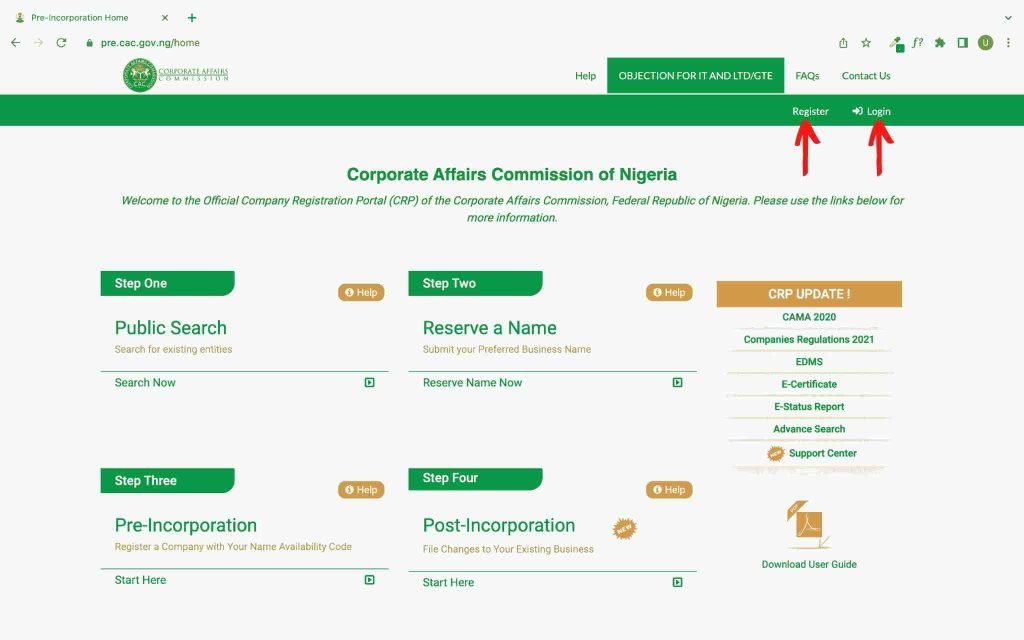
Be careful to enter all information correctly and ensure your spellings are accurate. Also, remember to store login details safely as you will be needing them to access your dashboard.
Once you have finished completing all entries, you would be prompted to confirm the email address you entered. Go to your email, and do so at once.
Step 2: Make A Name Search
Now, you’re done with creating an account, good work! It’s time to get approval for your business name.
This stage requires you to provide two preferable names for your business. The second name is optional, but the idea is that if the first one doesn’t earn approval, the second might be considered.
Sometimes, both names will be disapproved, which implies that you need to carry out another name search.
A fee of about N600 is required to carry out the name search each time. So, make use of the two options wisely, you do not want to incur extra costs by getting many rejections on your business name.
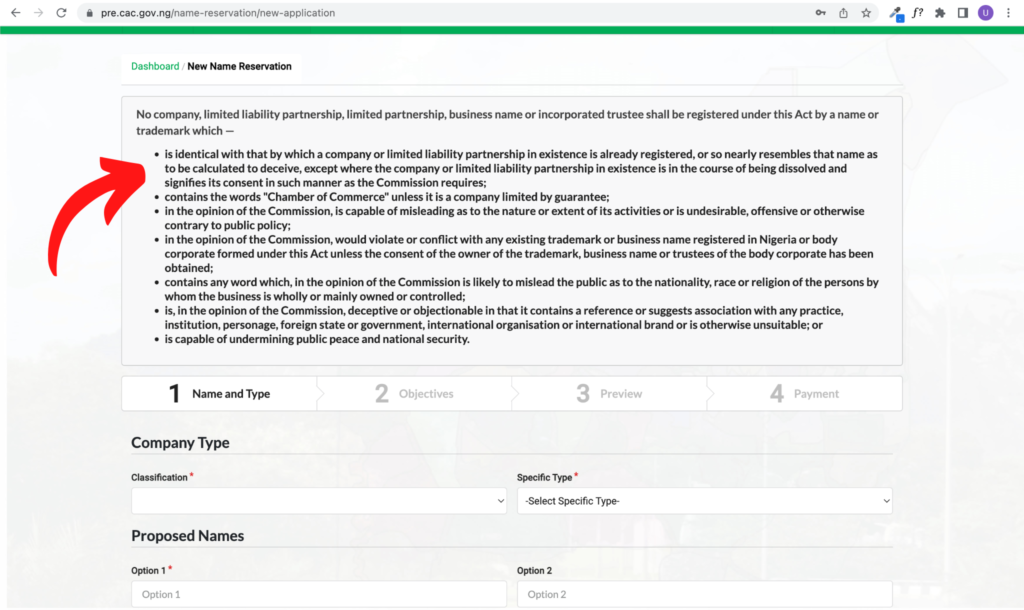
Remember to read and understand the notice provided on the name reservation page (see IMG 2) which guides the user on what kind of names would not be approved by the CAC, so you don’t send requests that are already rejected on arrival.
It’s important that the two options you enter are names that you can go with, that is, ask yourself, “if my second choice is approved instead of the first, will I proceed with it?”
But don’t give yourself a hard time with an alternative to your preferred name. If you have two entirely different names you can go with, great! But if you have just one that you prefer, you can add some tweaks to it in a way that your key name is preserved.
How so?
Let’s say I want to register a fashion business and I’m specifically in love with the name “Allure Fashion.” While this will be my first name option, the second can be “Allure Fashion House” or “The Allure Fashion Designs.”
Notice how my key name is still preserved through the both choices?
Adding one or two words to your preferred name always does the trick rather than throwing away the name because it wasn’t approved.
Some names are rejected not because they have been taken, but probably because they do not meet other criteria of the CAC.
Now let’s get in-depth with the name reservation.
This process consists of four easy sections. The first two require details for your new business, while the other two are for your preview and payment.
Log into your dashboard using the username/email and the password you created.
It’s smart to save your password on your browser so whenever you visit you can swiftly access your dashboard without needing to log in all over.
The CAC dashboard is quite easy to navigate.
Click on the ‘New Name Reservation’ button as shown in the IMG 3 below. This will take you straight to the first section.
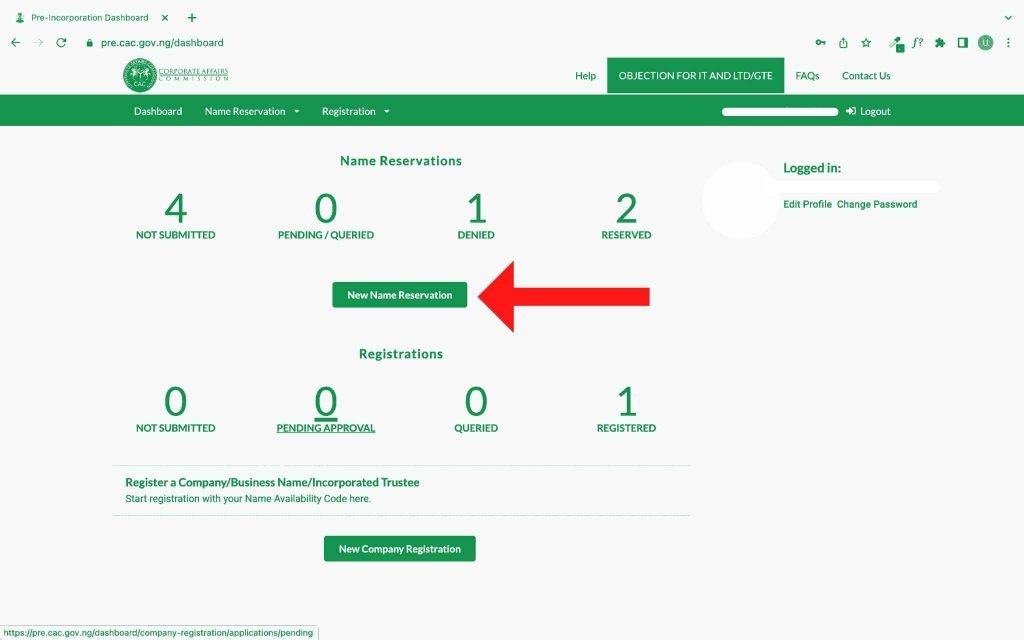
For the fields labeled “classification” and “specific type,” your selection should be “business name” and “sole partnership” respectively if you’re the only owner of the business. If you’re in a partnership, then you can select “partnership” instead of “sole partnership.”
To proceed after each stage, click on the “save and continue” button.
In the second section where you are asked for “nature of business” and “specific nature,” look out for options that align with your business. If you don’t find an option that describes your business precisely, just select the closest to it.
The third section is where you get to review all you have entered to confirm accuracy.
Carefully confirm that all you have written are in order. Remember to check your spelling; you can’t afford to make a mistake in the spelling of your business name or other vital details.
Once you have satisfactorily reviewed your entries, proceed to make payment.
It often takes a few working days for an approval or rejection note to hit your email so keep an eye on your mailbox.
If all your names were declined, don’t be overwhelmed. Brace up and carry out the process again.
If any of your proposed names are approved, great! The email will notify you which one precisely got approved.
You will also receive what is called a “name availability code” which is like a special number assigned to your approved name. You will be needing this, so keep it handy.
At this point, you have officially secured a business name and are just a few steps away from achieving your goal. Bravo, keep going!
Note: After name approval, CAC will reserve your business name for a period of 60 days, which is your window to complete the registration process.
Once the 60 days grace period is over, your name will no longer be reserved. Someone else can claim it, plus you can no longer register it for yourself because the reservation is expired.
The only option would be to carry out another name reservation and see if the name again is still available.
You cannot allow this to happen, so be proactive by completing the process as soon as possible.
Step 3: Carry Out The Registration Process
Having secured approval for your business name, you’re now all set to register your business properly. Remember, what you did all along was reserve the name.
To begin registration, log into your dashboard.
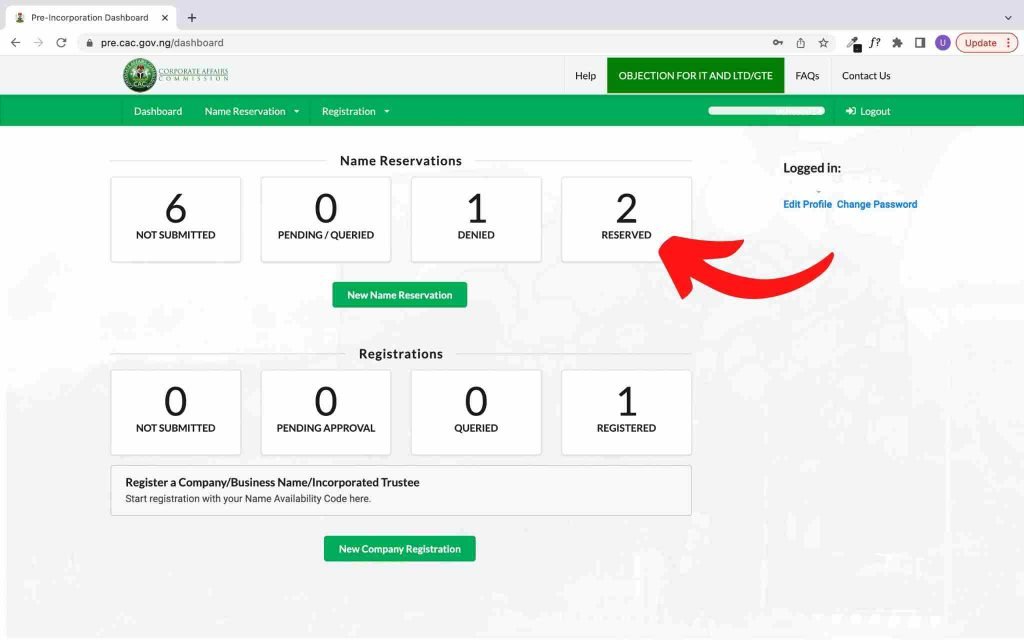
By now, you should be familiar with the interface and can easily identify the stats of your activities on the CAC portal. The number of your reserved will now read “1” if this is your first reserved name ever.
Click on the “reserved” button as seen in the image below, you will find details of the name that has been approved and reserved for you. To begin registration, hit the “start registration” option.
The registration process is in six sections as outlined below.
- Business details: here you’re required to enter details of your business like the commencement date, address, and email. When you are done, click the “save and continue” button to proceed to the next stage- this is what you should do after each stage.
- Particulars of Proprietors: you’re the proprietor because it’s your business and you’d be the one overseeing it, wouldn’t you? If you’re the sole owner, click on “add individual partners” or select the other partner options as may fit you if you’re not in the business alone. Fill in every required field and proceed.
- Nature of Business: click the dropdown and select the option that best describes your business. Yes, you may not find the exact match, but pick the one that is closest. Where you see “other nature of business”, write a few words that describe your business.
- Document Upload: this is quite straightforward. No words. All you need is to upload files of your ID, signature, passport, and any other document you think is necessary. You can notice the files you are permitted to upload are PDF or JPEG/PNG files.
- Preview: review all you have entered and confirm that everything is in order. Remember, once you make the payment, you cannot make changes. You will be stuck with every detail you have entered till your certificate is out.
- Payment: If satisfied, then it’s time to proceed to payment and get this whole process finally done. The payment section will require you to make payment using “remita”. The total fee is about N11,000.
When done with payment, you will be notified of success. Make sure to download your receipt for keeps.
Step 4: Await Feedback and Certificate
You’re done, kudos! All to do now is wait. Once your certificate is ready, which should usually take around a week or more, you will be notified via email from the CAC.
Once you receive the email notifying you that your registration is completed, you should log into your dashboard to view your certificate and additional documents.
Click on “registered” and you will find all credentials for your newly registered business name ready for download.
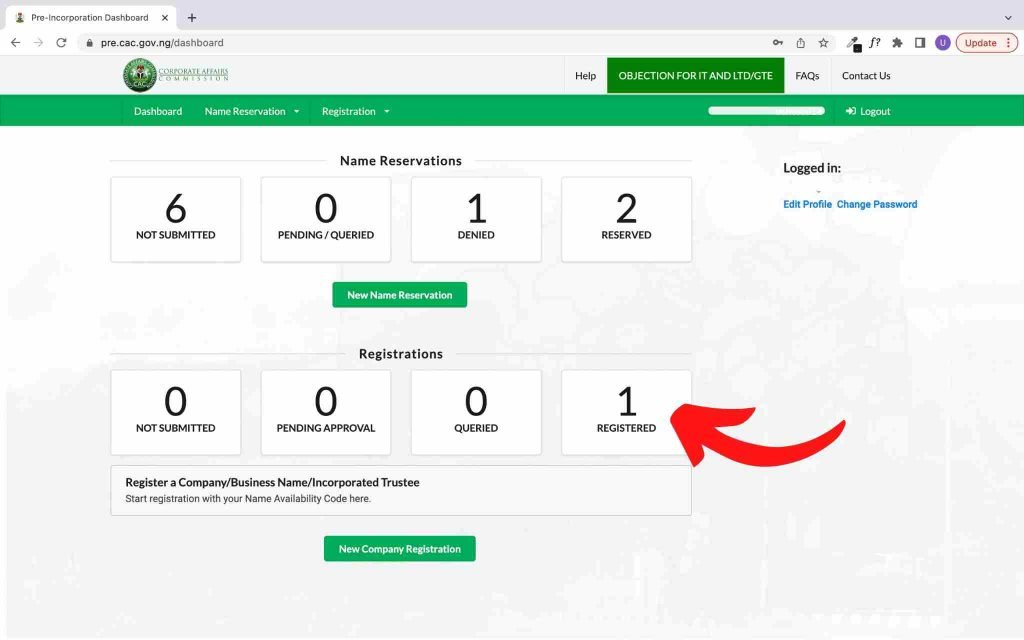
Download your certificate and the additional documents provided. Do not procrastinate. Also, remember to save them in your cloud storage or wherever you know they’d always be accessible.
Take note you will need your all CAC credentials whenever you want to take important steps for your business like getting TIN and opening a corporate account. So, keep them safe.
Pitfalls You Should Avoid
The CAC operates with so much stringency, if you do not take precautions, you could end up getting stuck during registration and sometimes lose the money you put in.
Take good note of the following precautionary measures and keep them in mind while you carry out your business name registration.
- When creating an account with the CAC, make sure your full name is written in the exact way you have it on any identification means you intend to present. If you fail to do this, your registration will be rejected.
- At the point of registration where you’re asked to input the date you commenced your business, make sure the date is less than 28 days from when you started the registration. Failure to do this will require you to pay a fine of 150 Naira for each day outside the 28 days window.
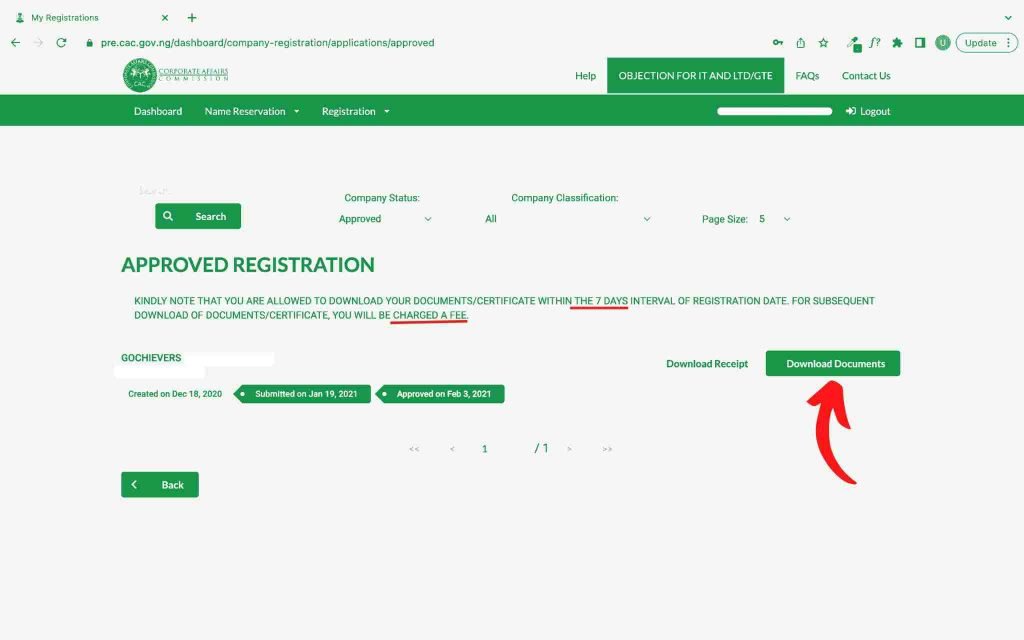
- Once your certificate is ready, download it along with other additional documents from your dashboard immediately. After 7 days, you will need to pay the sum of 5000 Naira to download them. See IMG 6 below.
Frequently Asked Questions
A. What should I do if my proposed names are both rejected by the CAC?
Ans: this is not unusual. If it happens, carefully read any reasons for rejection they provided in the email and take heed to it when making the next name search.
B. How long will CAC reserve my approved business name?
Ans: 60 days. After this period, your reservation will expire and you will no longer be able to register it.
C. What should I do if I cannot log in to my dashboard with my correct details?
Ans: sometimes even when your details are correct, you might not be able to log in. Helpful tips will be to clear your browser cache or reset your password.
D. What should I do when I am queried?
Ans: Getting queried once or multiple times is no cause for alarm. Carefully read what the query says and comply with it to resolve the query.
Conclusion
Great job! Your business is now officially registered under the Corporate Affairs Commission of Nigeria! Now, you’re more advantaged. Dream, push, thrive and bloom! I’m rooting hard for you!
Please feel free t am readily available to respond to any questions you have as you register your business. It will be my utmost relish for you to write back telling me how this post was helpful during your business name registration.
I will be thrilled to read your comments.